
Where:Diary→Click an empty time→Break or Class→Repeat
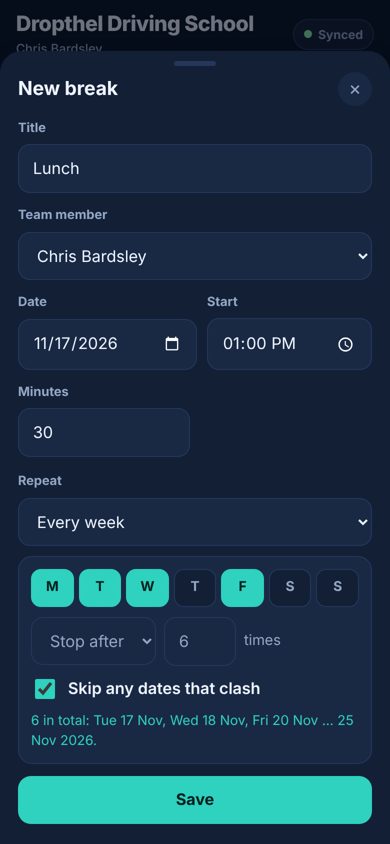
Step by step
- Click an empty time and choose Break or Class (in the app, tap + then Break or Class).
- Under Repeat, choose Every day, Every week, Every fortnight, Every month or Custom. Custom lets you pick every 1 to 12 days, weeks or months.
- For weekly repeats, tap the days it should happen on – for example Mo, We and Fr.
- Choose when it stops: after a number of times, or on a date.
- Leave “Skip any dates that clash” ticked to leave out any dates where something is already booked. Untick it if you’d rather nothing is saved when a date clashes – you’ll be told which date.
- The line underneath shows what will be created. Save.
💡 To repeat a break or class you’ve already made, click it and use “Also repeat on more dates”. The one you clicked stays as it is and copies are added.
💡 Up to 104 dates at a time.
💡 Monthly repeats keep the same date; months without it (like the 31st) are skipped.